A shop that knows where every job, sheet and hour is.
Vexion is a manufacturing execution system (MES) for small metal fabrication shops. From STEP models, PDF drawings and parts lists it builds the assemblies and parts, proposes the operations and who does them, plans machines and people and tells you when a job runs late. Workers report what they made from their phones, and you see what really happened next to every estimate.
- Sheet
- 3000 × 1500 mm
- Parts
- 55
- Sequence
- Inner contours before outer ones
- Remnant
- 1512 × 656 mm, to the rack with a code
What changes in the shop
| Today | With Vexion |
|---|---|
| The manager does not know what is happening in the hall until they go and look. | The plan, the review queue and a screen in the hall show who is working on what, live. |
| Workers do not know what is next until somebody tells them. | Workers see their tasks on their phone, in order, and what comes after them. |
| Somebody retypes the customer’s model and parts list into a spreadsheet, part by part. | STEP, PDF and the parts list become a proposed set of assemblies and parts that you review and accept. |
| When one step runs late, you find out too late that the deadline is gone. | A delay moves the following operations, and the manager knows at once whether the job is late. |
| Somebody types the supplier’s invoice into a spreadsheet, line by line. | An invoice or e-invoice becomes a goods receipt, its lines matched to your materials. |
| Afterwards nobody knows how long the job really took or how much sheet it used. | Every task has an estimated and an actual time and material, with a reason for the difference. |
One job through the shop
The same job, from the customer’s drawing to an approved task. The numbers are the operation sequence, as on a routing sheet.
| Op. | Operation | Who | Where |
|---|---|---|---|
| 10 | Documents and the proposed structure | Manager | Browser |
| 20 | Structure and operations | Manager | Browser |
| 30 | Dates and the plan | Manager | Browser |
| 40 | Material and goods in | Manager | Browser |
| 50 | Cutting | Manager and operator | Browser and print |
| 60 | Work in the hall | Worker | Phone or tablet |
| 70 | Review and stock | Manager | Browser |
| 80 | Time and analytics | Manager | Browser |
-
Documents and the proposed structure
Upload what the customer sent onto the element: the STEP model, PDF drawings, an Excel parts list and DXF files. The system reads them together, recognises the same part across files and proposes the assemblies and parts with quantity, material from your catalogue, sizes and mass. Nothing is created until you accept.
- Every value carries its source: STEP, model, PDF, parts list or calculated
- Where the documents disagree, the value is marked for checking
- Bolts, nuts and other bought items are recognised and do not become parts
- A DXF part gets its sizes, cut length, holes and a check whether it fits your machine
- A new revision shows what changed and what it touches in the shop: apply, hold or reject
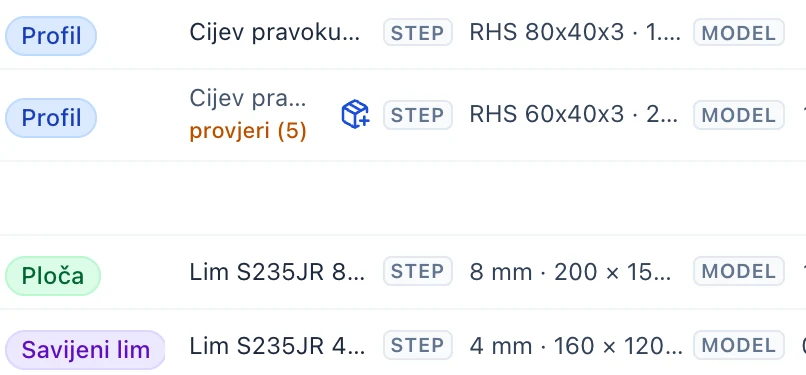
Detail A: kind, material and the source of every value 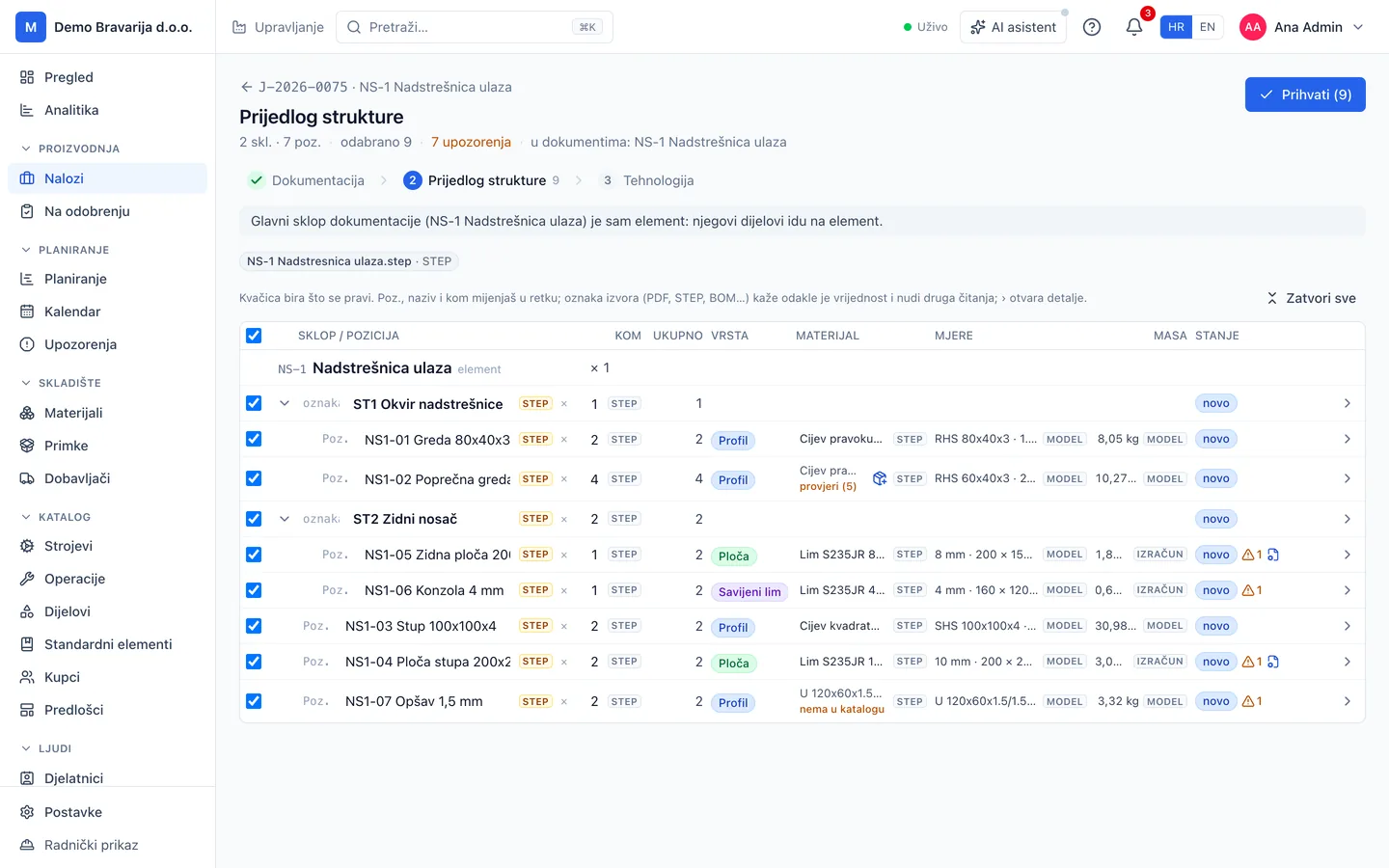
Element, Prijedlog strukture (proposed structure)Manager, browser
From the 3D model straight to the laser
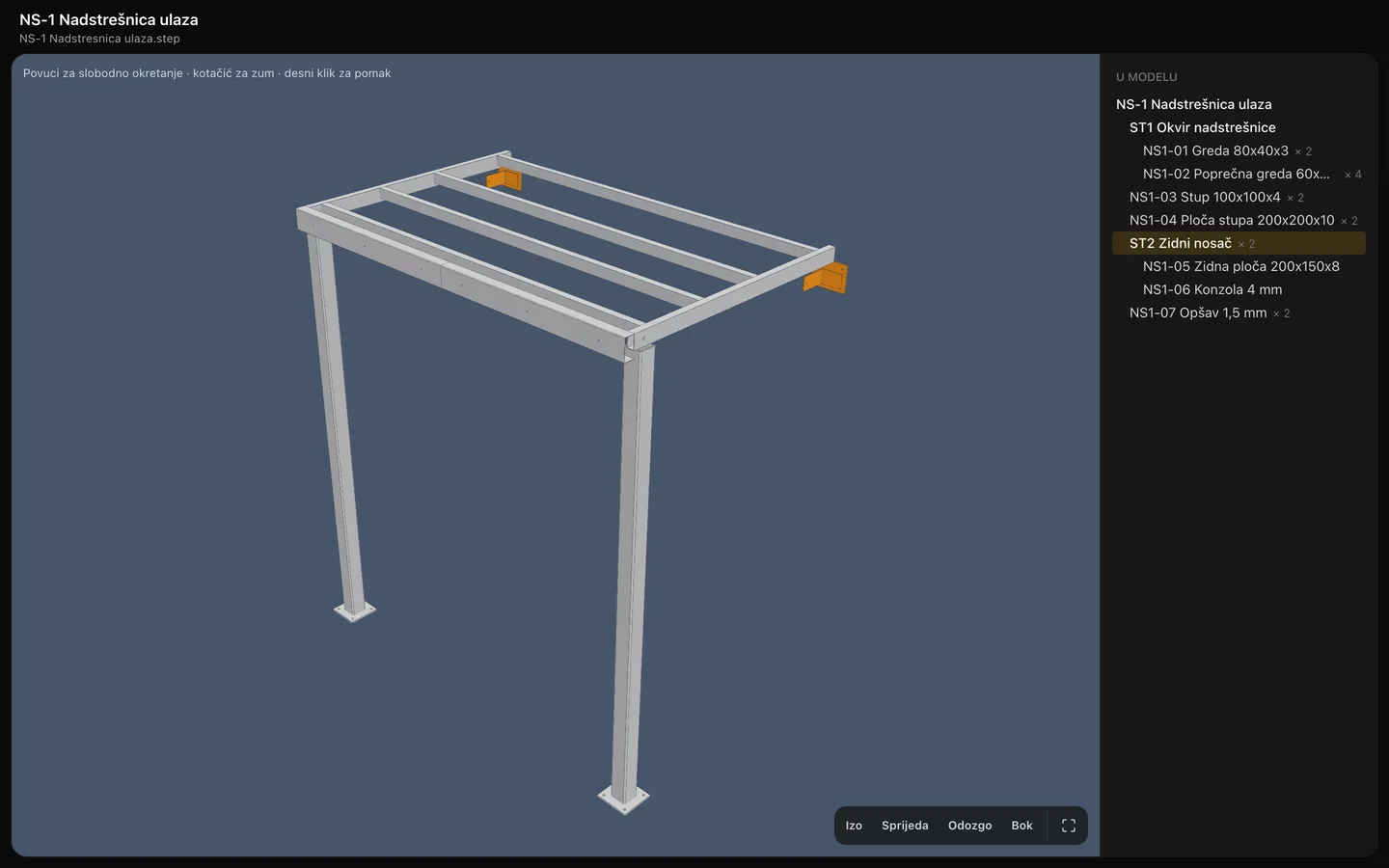
The model opens in the browser, no CAD licence needed. For bent sheet the system works out the developed blank on your press brakes and dies, writes the laser DXF and the bend plan, and checks whether the part can be made at all.
- Turn the model with the mouse; point at an assembly’s name and its parts light up
- The developed size uses the bend deduction of your dies, not a textbook value
- A laser DXF and a DXF with bend lines for every sheet part
- Checks: thickness for the laser, sheet format, a flange too short, a hole too close to a bend, whether the part fits the powder line
- A plate in the model without a drawing gets its DXF in one click
NS1-06
Console 4 mm
Developed blank
| No. | Bend | R | K | BD | Die and punch |
|---|---|---|---|---|---|
| 1 | up 90° | 5.83 | 0.37 | 8.2 | V35 · 88° R0.8 |
- Developed 271.8 × 80 mm fits a 2000 × 1000 sheet
- Bending force 24 kN, within the press
- The part fits the powder coating line
- Material
- S235JR 4 mm
- Mass
- 0.68 kg
- Output
- Laser DXF
-
Structure and operations
An element splits into assemblies and parts, as on the drawing. Operations live on every level: cutting and bending on parts, welding on the assembly, installation on the element. Make technology puts them in order with a machine and an estimate, and proposes who does each one.
- Quantities multiply down the tree: 2 brackets with 2 plates each make 4 plates on the job
- The picker lists only the people allowed to run that operation or machine
- Each proposal says why: the only one qualified, the least loaded, or did similar work 12 times
- An assembly waits for its parts, the element for its assemblies
- Changing the element’s quantity recalculates parts and operations
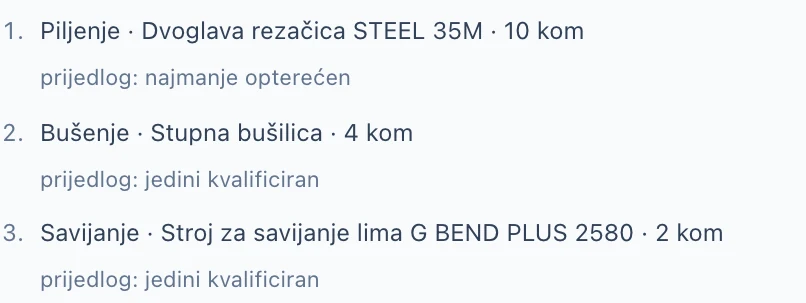
Detail A: who should do it, and why 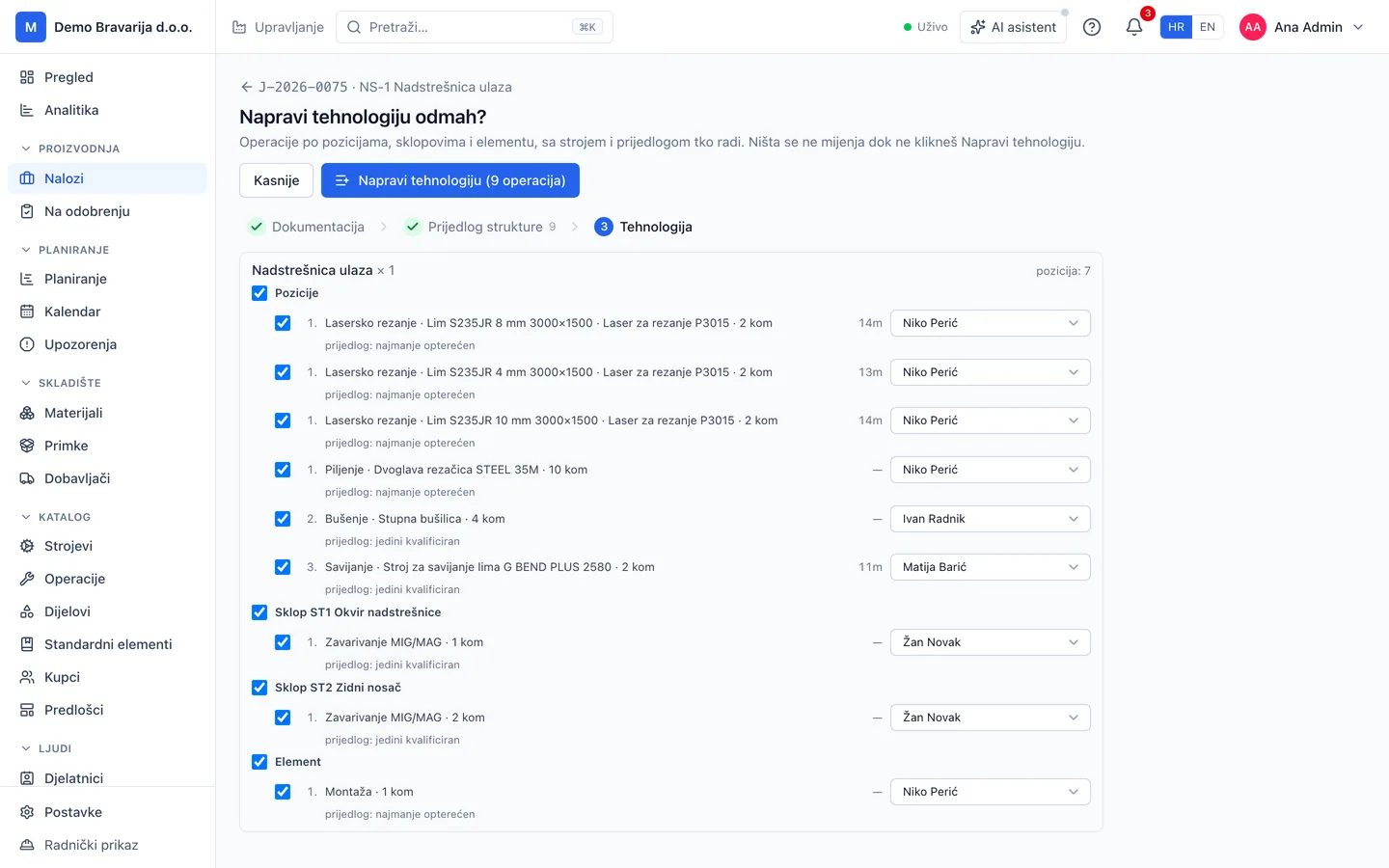
Element, Napravi tehnologiju (make technology)Manager, browser
PO-2514
Fence panel 2500 × 1400
Version 1
| Step | Operation | Setup | Per piece |
|---|---|---|---|
| 1 | Laser cutting | 10 min | 7.7 min |
| 2 | Bending | 10 min | 10.5 min |
| 3 | MIG/MAG welding | 10 min | 32.3 min |
| 4 | Powder coating | 15 min | 13.0 min |
On a job
- 12 pcs13 h 26 min
- 22 pcs24 h
- 40 pcs43 h 1 min
setup 45 minper piece 63.4 min
- Category
- Fences
- Customer
- Own
- On jobs
- 2
What you make again and again, you enter once
A panel, a post, a bracket: an element that keeps coming back is saved to the library with its operations, parts and drawings. On the next job you type its code and a quantity, and the estimate is worked out per piece.
- Add an element by its code or name, with a quantity
- Its operations, machines, material and drawings come with it
- A job template is a list of standard elements
- When an element changes on a job, you choose: update the standard, save it as new, or keep it for this job
- Older jobs keep the version they were made from
-
Dates and the plan
Propose dates places the job’s open operations around all the work already planned, with leave and machine downtime, and tells you at once whether the job makes its delivery and installation deadlines. The dates are written only when you accept.
- Fits, tight or late, with the earliest finish and what holds it back: a machine, people or an operation
- When an operation runs late, the following operations of the job move by themselves and the manager is warned
- A late job and element carry a tag: 2 days late
- Gantt by element with the deadlines, plan by worker and machine, and a day by the hour
- Machine downtime, leave, sick days and outsourced work on the same plan

Detail A: an answer for each deadline 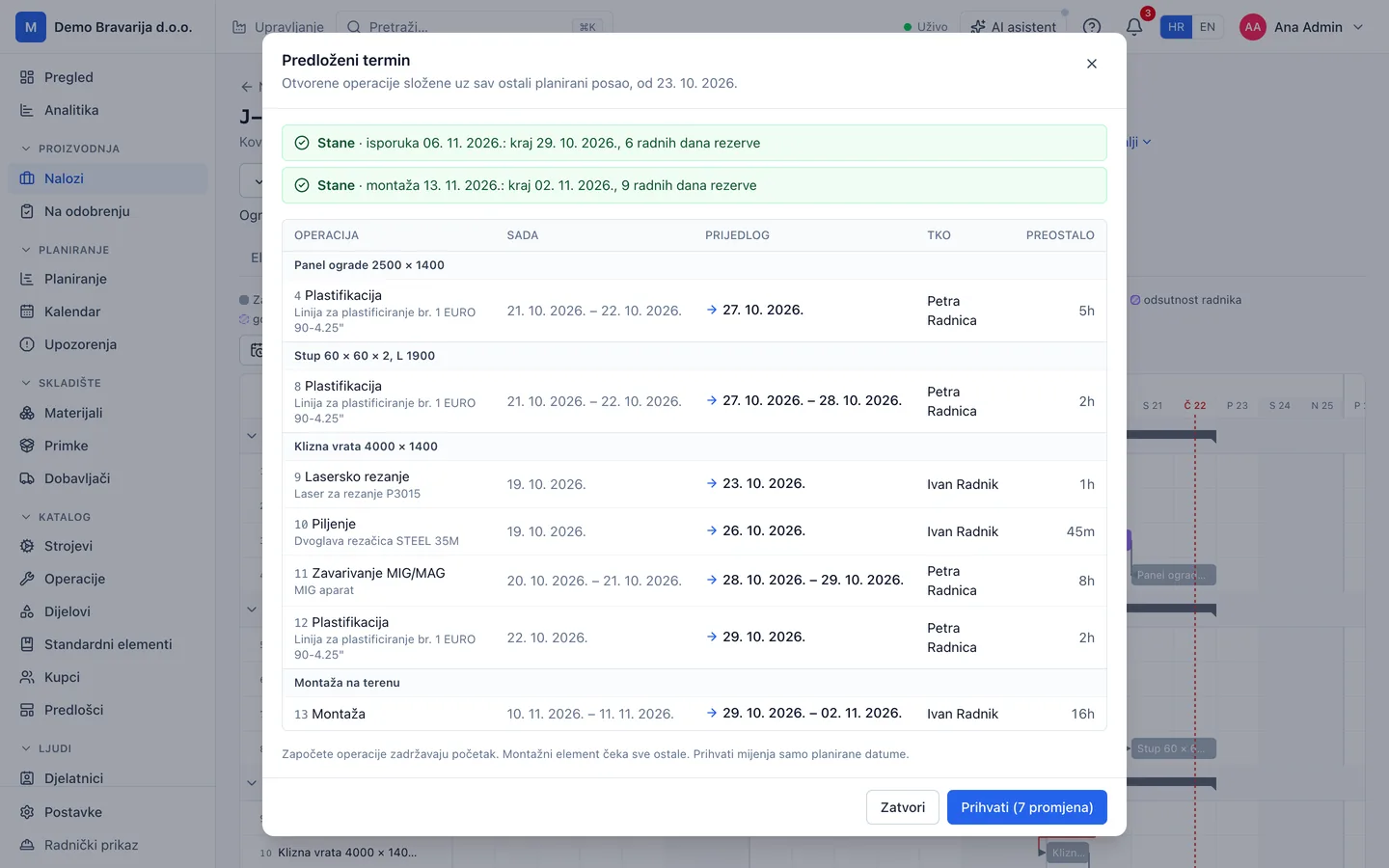
Job, Predloženi termin (proposed dates)Manager, browser -
Material and goods in
As soon as a task gets its material, the system checks it against stock and says what is missing. When the goods arrive, the supplier’s invoice becomes a goods receipt: a PDF, a phone photo or an e-invoice, matched line by line to your materials.
- A material shortage shows on the job as soon as it is planned
- E-invoices are read without AI; PDFs and photos by the provider you choose
- Units convert by themselves: a box of powder to kg, bars to metres, sheets to m²
- A line you confirm once is recognised for sure the next time
- Prices per supplier for every material, the best one marked
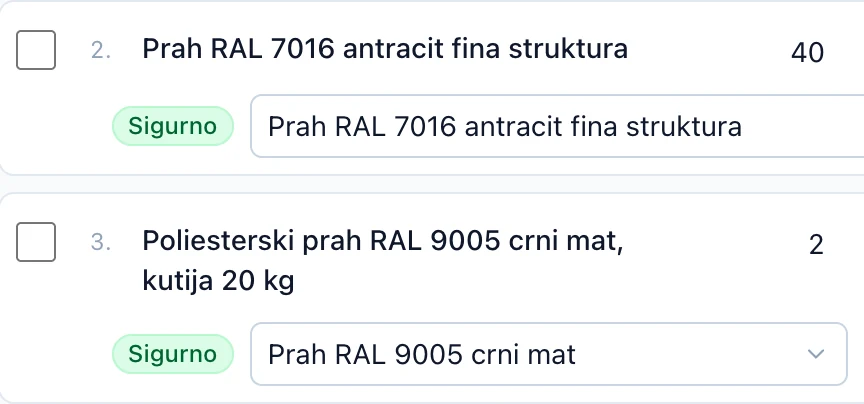
Detail A: invoice lines matched to the catalogue for sure 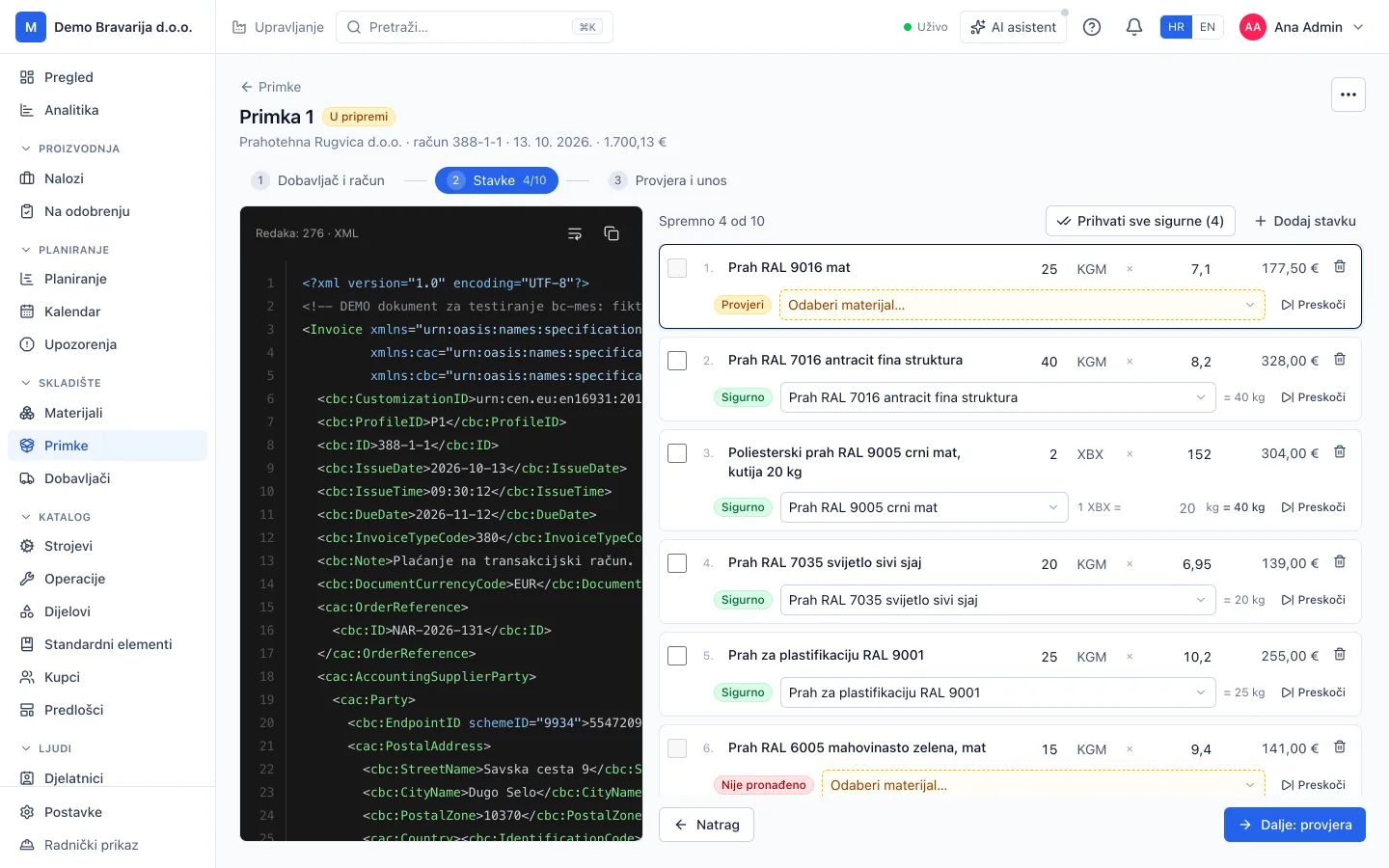
Storage, goods receipt from an e-invoiceManager, browser -
Cutting
Everything waiting for the laser, across all jobs, grouped by material and thickness. Batch tasks together, look at the sheet layouts and print the list for the operator.
- Sheet layouts with the utilisation of each sheet
- Remnants with a code, reserved for the batch that uses them
- A sheet DXF to check in the laser’s own software
- A printout of the sheets with parts and quantities for the operator
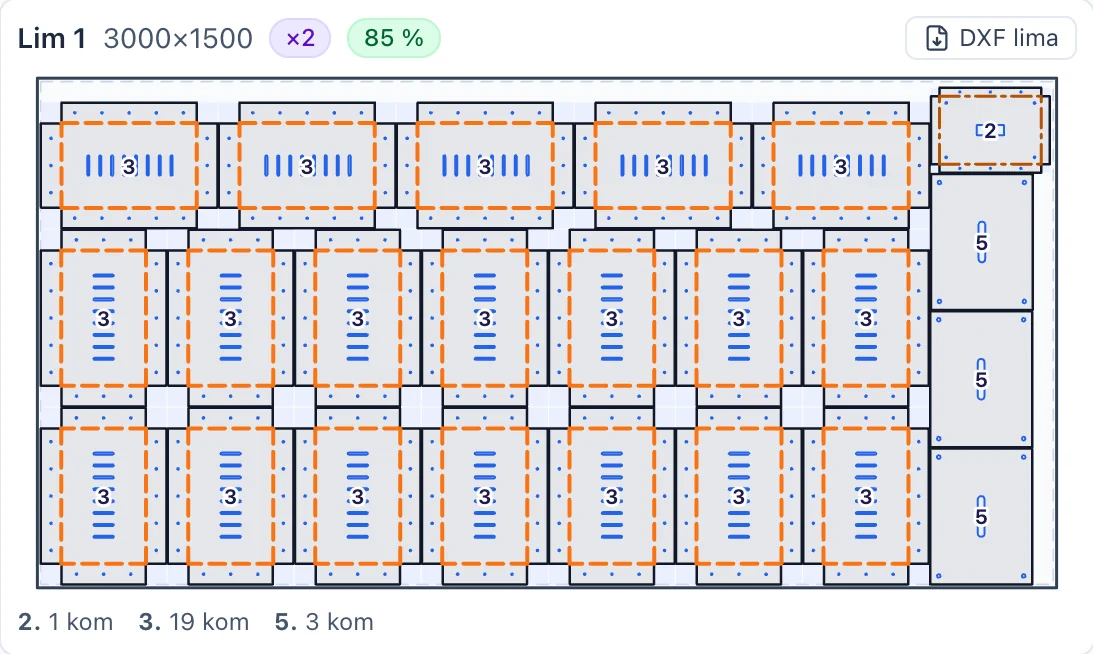
Detail A: one sheet with its positions, utilisation and DXF 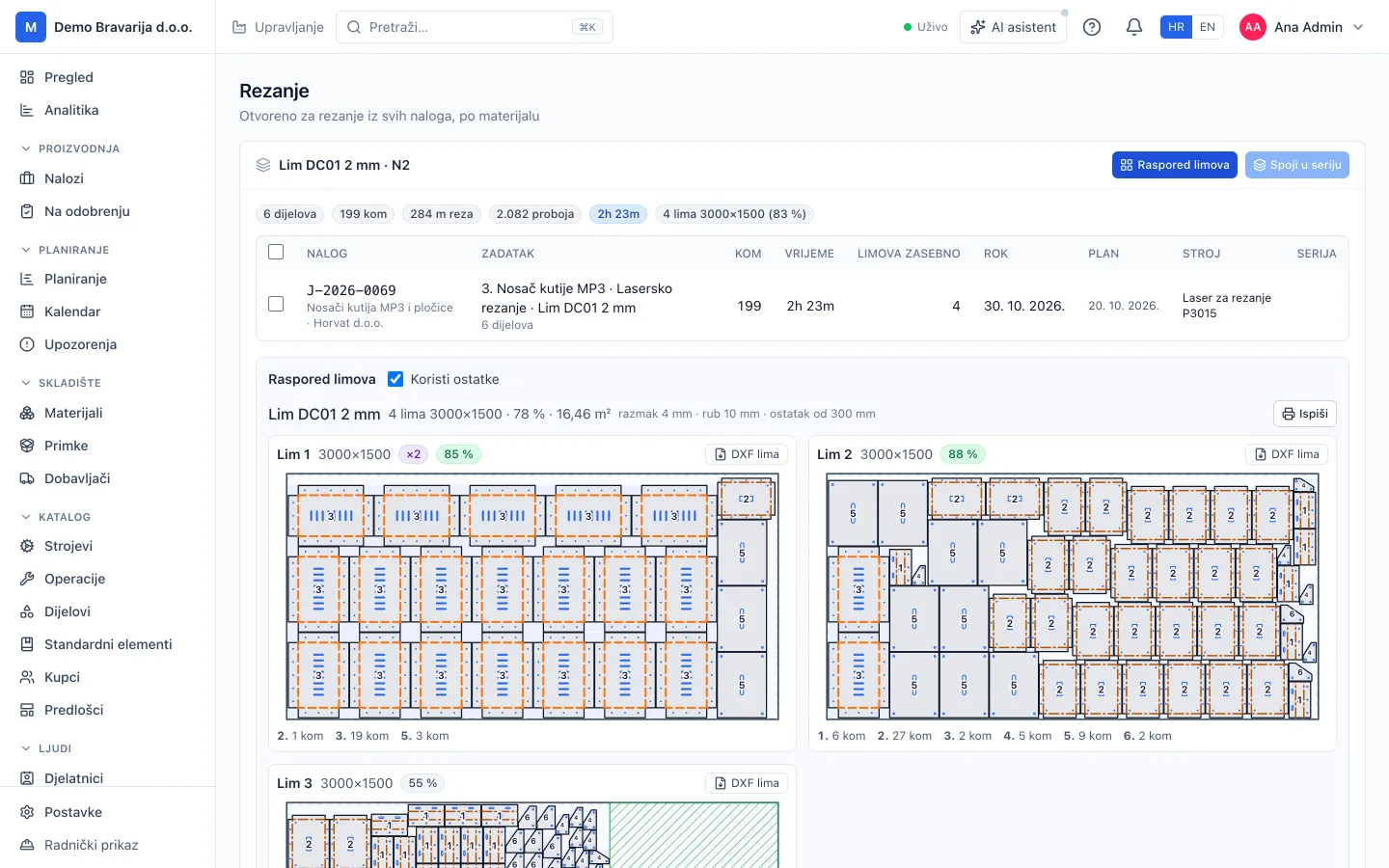
Cutting, sheet layoutManager and operator, browser and print
Workers learn it in five minutes
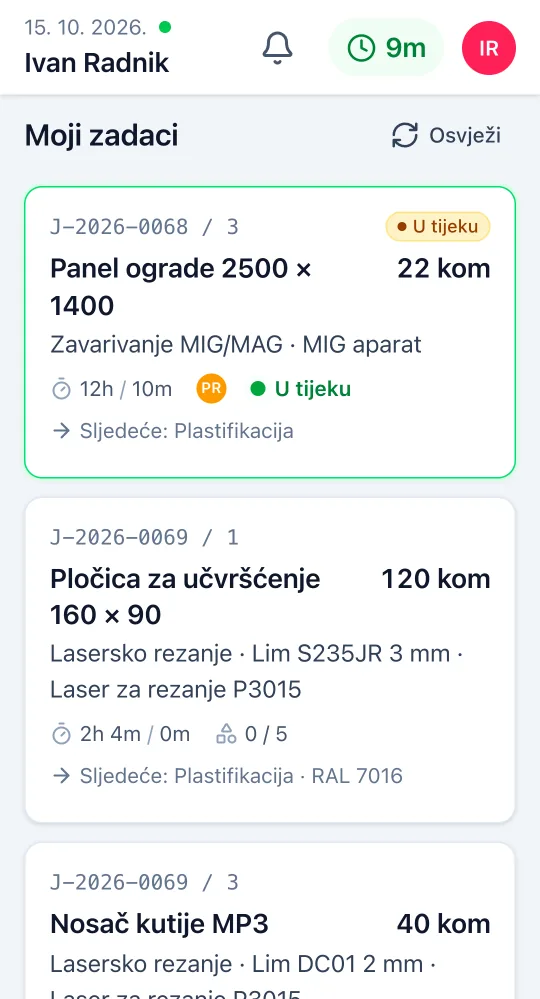
On their own phone or a shared tablet in the hall. Clock in, my tasks, start, pause, done. One active task, big buttons, few words, in Croatian or English.
- Each task card says the element, the quantity and the next operation
- At the end of a task they confirm the material used, and pick a reason if it differs
- Progress per part: how many pieces are made and how many scrapped
- A blocker with its reason reaches the manager at once
- Works without signal: actions are sent as soon as the connection is back
- A PIN kiosk for a tablet the whole shift shares
- When the manager holds a drawing change, that part’s task waits and the worker sees why
- The manager sees live who started, finished or blocked an operation
- Clock in and out, sick leave and annual leave requests from the same screen
- Drawings and instructions on the task, no searching through folders
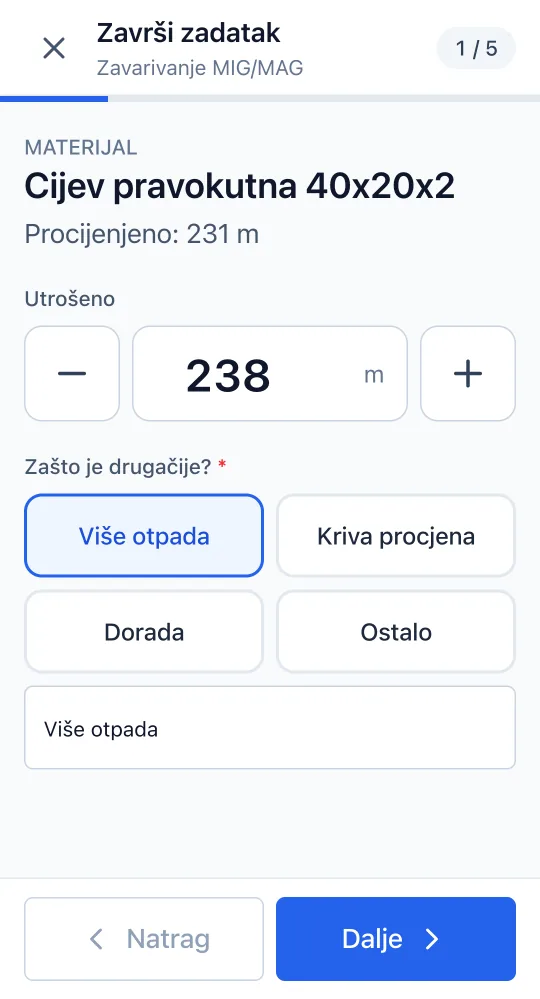
A screen in the hall
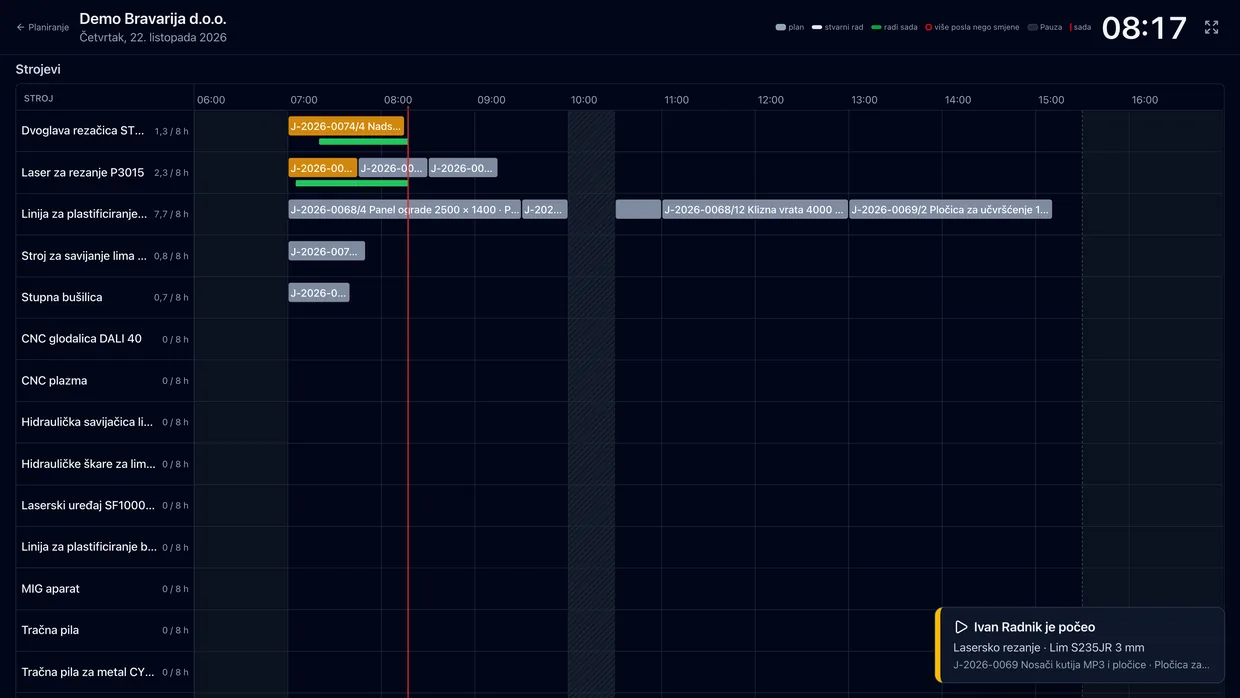
A TV in the hall shows today’s plan by the hour for every machine and worker, and what is being worked on right now. When someone starts or finishes an operation, it appears on the screen. It runs all day without a touch.
-
Review and stock
A finished task takes its material off stock and records its cost. Where a check is needed, powder coating for example, the task waits for the manager first: they see the estimate and the actual, the reason for the difference and the worker’s note, then approve or return it.
- Turn review on for the whole company or for a single task
- Every difference has a reason: more waste, wrong estimate, rework
- A task goes back with a comment if something is off
- A warning when a material drops below its minimum
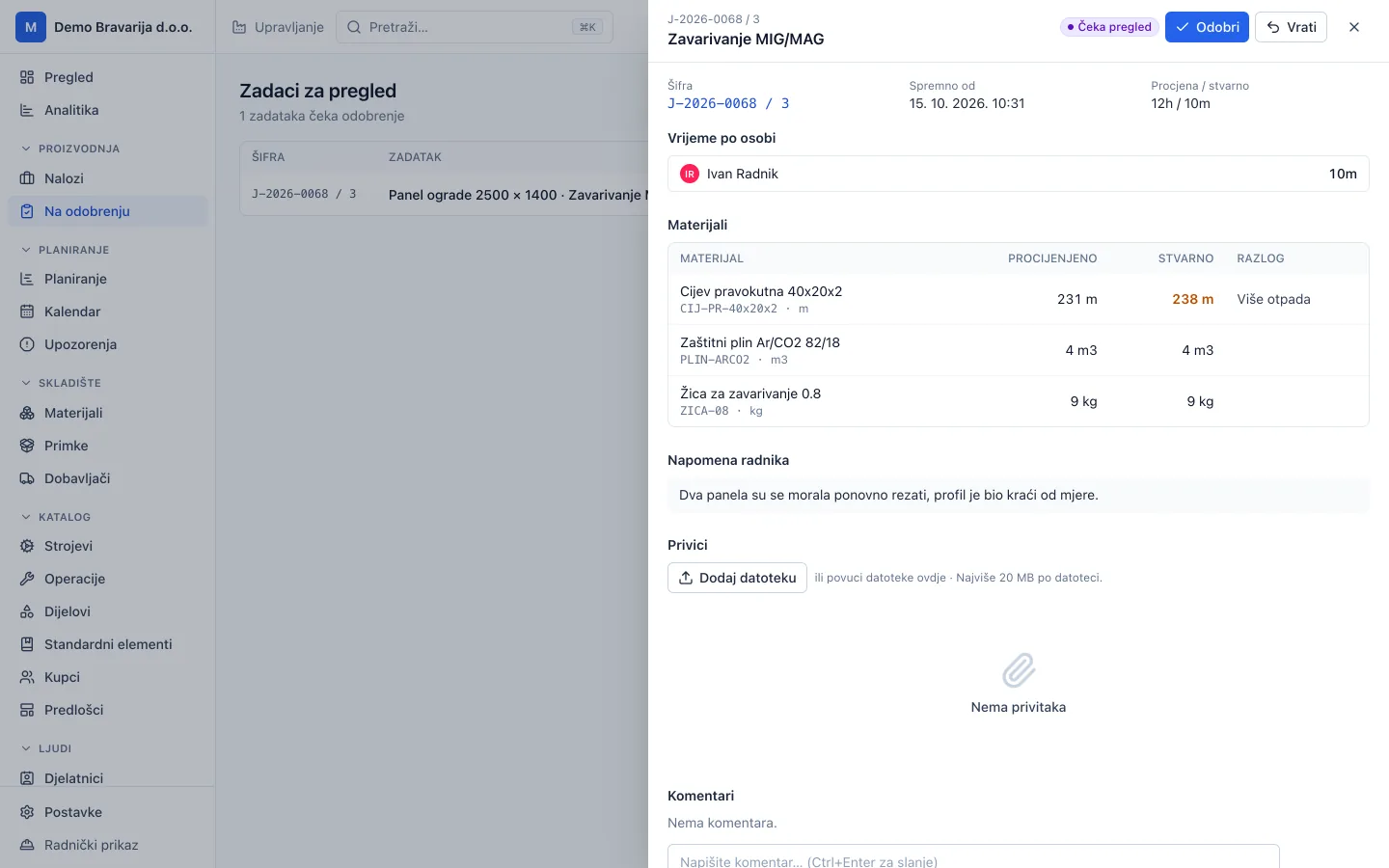
Awaiting approvalManager, browser -
Time and analytics
Every step carries an estimated and an actual time. Analytics per job, worker and step show where estimates go wrong and suggest a new estimate, and machine speeds are calibrated from finished tasks.
- Timesheets with overtime, corrections and export to CSV and Excel
- Notifications by push and e-mail, each user picks which
- A job log: who changed what and when
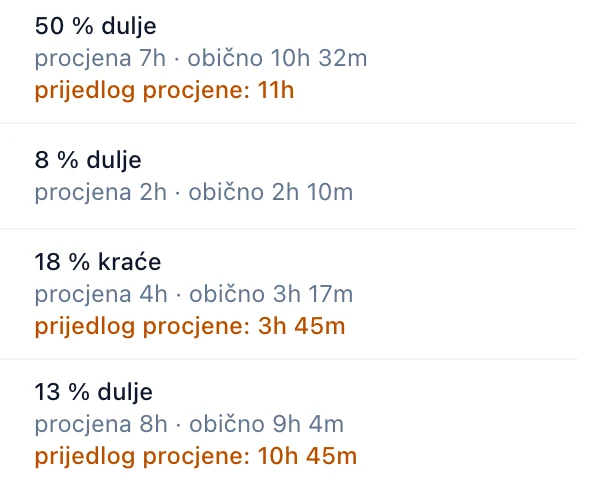
Detail A: the difference from the estimate and a suggested new one 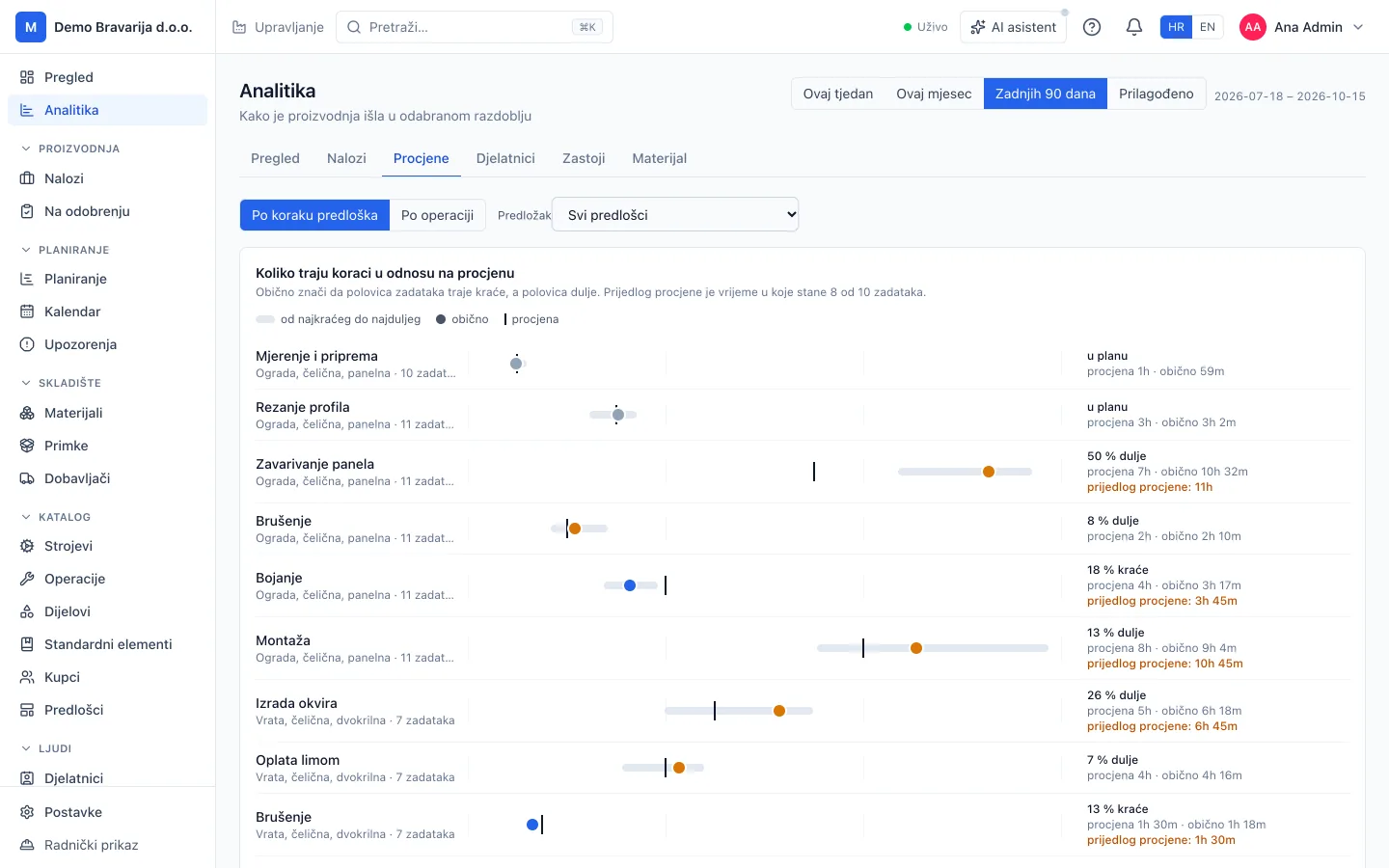
Analytics, estimates per stepManager, browser
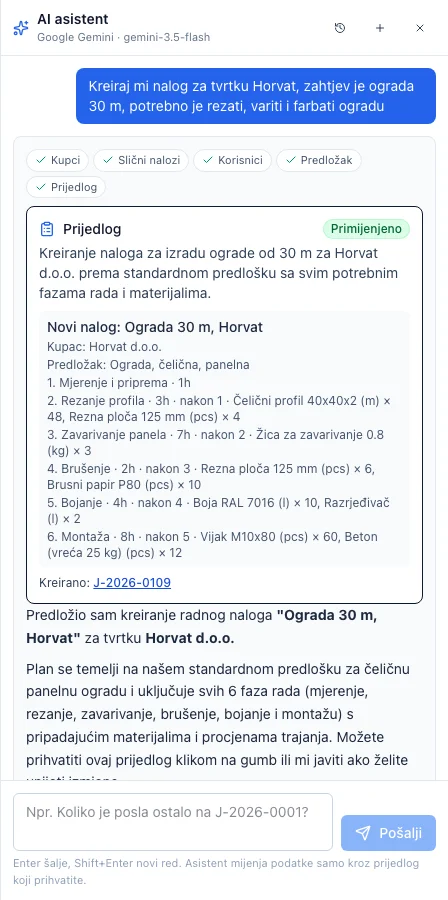
An assistant that asks before it acts
Ask in plain words: how much work is left on a job, how long welding a panel usually takes, who worked overtime this week. It answers from your data. When something needs doing, it proposes a job with tasks and materials, and creates it only when you accept.
- You choose the provider: Google Gemini or Anthropic Claude
- It knows how the system works: it answers from the help articles
- AI also reads incoming invoices from a PDF or a photo; e-invoices are read without it
- Asked when a job can be finished, it answers with the same calculation as Propose dates
- AI reads scanned drawings and orders only when allowed, and it can be switched off per customer
- Without an accepted proposal the assistant changes nothing
Machines the system knows
Every machine has a technical sheet with its capabilities and limits. Each value says where it came from: the manufacturer’s documents, you, a calculation, or an assumption until someone confirms it.
- A check whether a part fits the machine: thickness, bending length, work area
- Every unconfirmed value in one list, with Confirm and Edit
- Statutory inspections with a reminder before they expire
- A power meter in the cabinet shows when a machine runs, idles or is off
- The laser’s job log links real cuts to tasks
- Breakdowns and maintenance show on the plan
- Press brakes with their dies and punches: bending is worked out on your own tools
| Value | Figure | Source |
|---|---|---|
| Laser source | Fibre | Manufacturer document |
| Laser power | 3 kW | Client data |
| Work area | 3000 × 1500 mm | Client data |
| Max thickness, stainless | 10 mm | Derived |
| Assist gas | O₂ and N₂ | Assumed |
Your instance, your data
Each company gets its own instance of the system. The office works in the browser, the hall on phones and a tablet, and the data stays in your own database.
What comes in
- Drawings and modelsSTEP, PDF, DXF and parts lists
- OrdersE-mail text as a suggested job
- Supplier invoicesPDF, photo or e-invoice to a goods receipt
- Your formatCSV, XML or PDF through a small adapter
Your instance For your company only
- DatabaseIts own, separate from other companies
- SubdomainYour address for the system
- FilesDrawings, PDF, images and video on the job
Who works in it
- OfficeManagers in the browser
- HallWorkers on phones, also without signal
- Shared tabletKiosk with a PIN for the whole shift
- AI provider, optionalGemini or Claude, only if you turn it on
- What goes outHours to CSV and Excel, laser DXF from drawings and models
- Adapted without programming
- Your own fields on jobs, tasks, materials and customers, templates, standard elements and a material catalogue.
- Files on the job
- Drawings, PDF, Word, Excel, images and video up to 100 MB, previewed in the app.
- Help in the app
- Short articles for every screen, and the assistant answers from them.
- Changes live
- What a worker reports, the manager sees at once, without reloading the page.
- Croatian and English
- The interface in both languages; each user picks theirs.
- Nothing to install
- Runs in the browser and installs as an app on phones and tablets.
Who it is for
Shops with 5 to 50 workers.
- Laser cutting
- Sheet bending
- Metalwork shops
- Welding
- Powder coating and paint shops
- Carpentry
- Fences and gates
What it does not do
Quotes and invoices, accounting, payroll and purchase orders to suppliers. It turns incoming invoices into goods receipts and exports hours for payroll; invoicing stays in your own software.
Questions
Do workers need a computer?
No. A phone or one tablet in the hall is enough. The app opens in the browser and is added to the home screen, without an app store.
What if there is no signal in the hall?
Start, pause and done are saved on the device and sent as soon as the connection is back. Workers do not wait.
Which documents does it read?
STEP models (assemblies, parts, profiles, plates and bent sheet), PDF drawings from CAD with their title block and parts list, parts lists in Excel and CSV, and DXF at 1:1 in millimetres. They are read together into one proposed structure that you review before anything is created.
Do we need a CAD licence?
No. The model turns in the browser, and the developed blank and the laser DXF are worked out by the system. CAD stays with whoever draws.
What if the customer sends a new revision?
The proposed structure shows what changed, part by part, and what it touches: operations already started, pieces made, material. You apply, hold or reject the change. While it is held, that part’s operations cannot start.
Does it work without a laser or drawings?
Yes. Jobs, elements, templates, tasks, time, materials and planning work just as well in a metalwork or carpentry shop that does not cut sheet.
Does it read e-invoices?
Yes. An XML e-invoice is read directly, without AI. A PDF or a photo of an invoice is read by the provider you choose, and you confirm every line before it goes into stock.
Is my data sent to an AI?
Only if you turn AI on and choose a provider. STEP models and DXF files never go to it. A PDF drawing is read without AI; it only gets the pages that cannot be read otherwise, such as a scan. Reading an order sends its text. All of this can be switched off for the whole company or for one customer.
Does the system change the plan by itself?
It proposes dates and writes them only when you accept. The one exception is a delay: operations of the same job that wait for a late one and have not started move by themselves, and the manager is warned when the job no longer makes its deadline. That can be switched off.
Does it do quotes and invoices?
No. You can copy a job’s costing into a quote, and invoices and payroll stay in your own software. Timesheets export to CSV and Excel.
How do we start?
With a conversation and a walk through your shop. Then we set up your instance with users, machines, materials, templates and standard elements, and the first jobs go through the system with our help.
See it on your own jobs
Send us a real model or drawing and a description of the job. We will show you the way from documents to an approved task.
- A conversation and a walk through your shop
- We set up your instance: users, machines, materials and templates
- The first jobs go through the system with our help